Every till, kitchen and stockroom. One system.
Point of sale, kitchen tickets, delivery, stock, customers and the numbers behind them. Set up for your trade on the day you sign up.
The counter, the catalogue and the stockroom, on one screen.
The parts every shop needs.
A sale moves stock, earns points, prints a kitchen slip and lands in the day's takings as one event, so no screen has to be reconciled against another.
Industries
Your trade decides what you see.
A kitchen screen belongs to a restaurant, not a pharmacy. Service orders belong to a workshop, not a bakery. Pick your trade at signup and the software arrives with the right modules switched on, the categories you sell, and the reasons stock goes missing in your line of work.
Food and drink
Kitchen tickets, order types and wastage that is recorded rather than guessed.
Retail
Variants, serial numbers, purchase orders and counts that hold up.
Health, beauty and fitness
Service orders and memberships beside a till that still sells product.
Services and repair
Job cards from intake to collection, with parts drawn off stock.
Leisure and hospitality
Several outlets, one catalogue, and reporting that separates them.
Trade and wholesale
Price books, on-account balances and transfers between outlets.
A counter that keeps up at five o'clock.
Scan or search, split the payment, hold the order while the customer fetches one more thing.
- Held orders sit in view, along the bottom of the till rather than behind a modal, because a forgotten order is one nobody gets paid for.
- Refunds name the sale they reverse, so the money can be followed back.
- Register close counts the drawer, reports the variance and asks for a note.
- Selling stops when the register is closed, including retrieving held orders.
Stock that agrees with the shelf.
Receiving, selling, refunding, transferring, counting and throwing away are six screens and one ledger underneath.
- Reasons are restricted by direction, so wastage cannot quietly add stock.
- Weighted average cost, so margin is reported against what you actually paid.
- Counts, waste and serial numbers for the trades that need them.
- Transfers need two different outlets and leave both sides in the log.
Numbers that say where they came from.
Every report returns the definition of what it counted, so an argument about last month's margin is settled on screen instead of in a spreadsheet.
Shown with the arithmetic
Revenue is net of tax. Gross profit is revenue less the cost of goods recorded on each line. Inventory value is quantity by weighted average cost. Voided and open sales are excluded from takings and kept in history for the audit.
Your day, not the server's
Days, weeks and months are bucketed in the shop's own timezone, so a late Saturday belongs to Saturday. Cost figures stay hidden from roles without permission to see them, on screen and through the API.
A dashboard, ten reports, and the ones you save
Sales, inventory, adjustments, cash movements, payments, register closures, gift cards, store credit, tax and staff. Filtered by outlet, register, staff member and period, exported when someone wants them in a spreadsheet anyway, and shared with the people who read them every Monday.
Learn more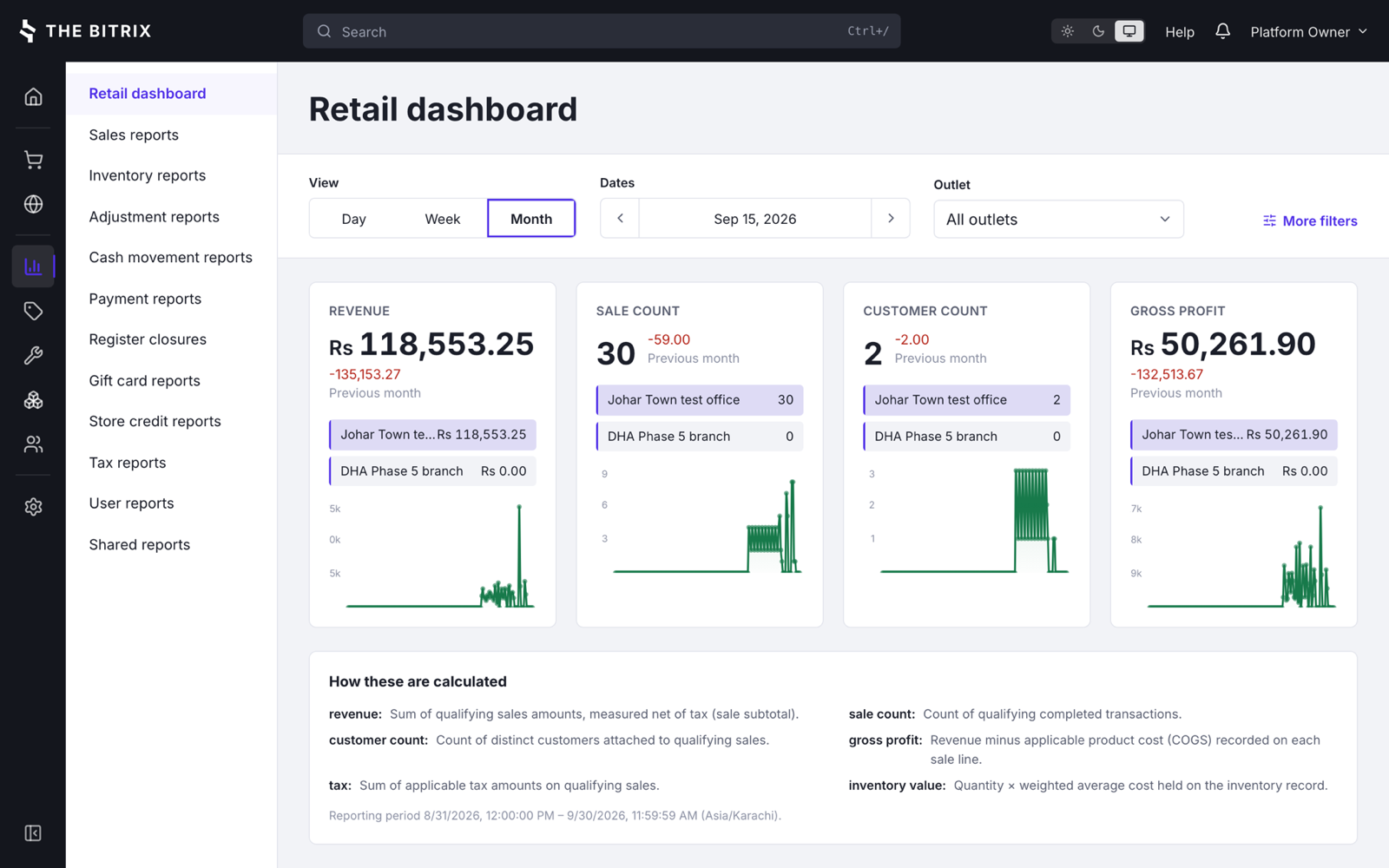
The month, by outlet, with the definition of every number underneath it.
It speaks the language your staff do.
Language and currency belong to the shop, not the installation, so one system runs a bakery in Lahore and a cafe in Krakow at the same time.
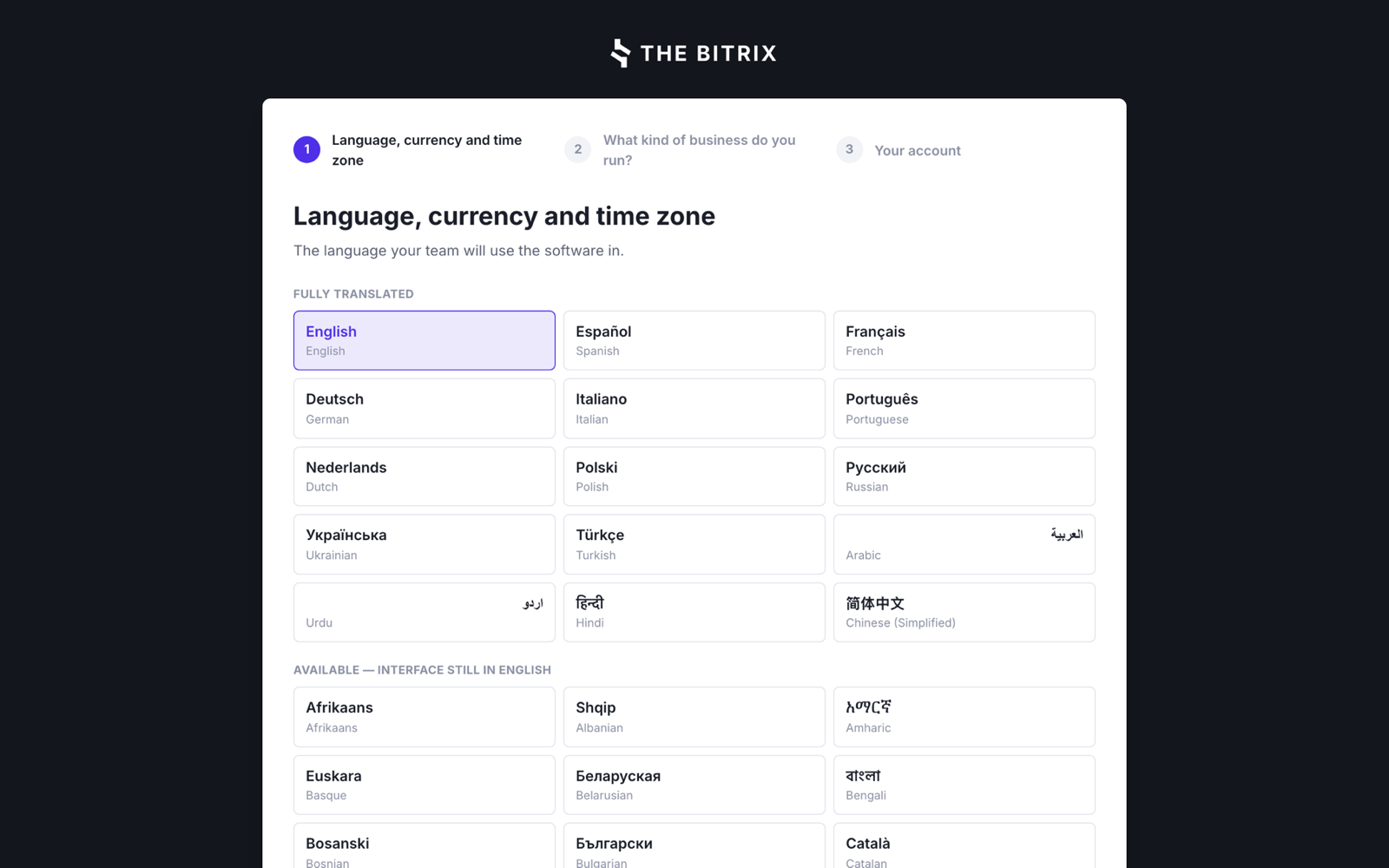
Chosen at signup, and changed later in Setup. Each language names itself, because that is what the person choosing can read.
| Currency and language | Written as |
|---|---|
| US dollar, English | $ 1,234.56 |
| Euro, German | € 1.234,56 |
| Złoty, Polish | 1234,56 zł |
| Rouble, Russian | 1 234,56 ₽ |
| Yen, Japanese | ¥ 1,235 |
| Kuwaiti dinar, Arabic | د.ك 1,234.567 |
One shop, or fifty.
The same software runs a single counter and a chain, and an operator can run the whole platform for other people's shops.
Outlets and registers
Stock, prices, staff and takings per outlet, with transfers between them and reporting that keeps them apart.
Price books
One catalogue, different prices per outlet or customer group, without a second product list to maintain.
Roles you write yourself
77 permissions in 8 sections. Each shop owns its roles, and a change applies on the holder's next request.
A console above the shops
Plans, invoices, dunning and suspension, plus a support view into any tenant that is announced in the interface and written to the audit log.
Seven days. The whole thing. No card.
Answer three questions about your trade and the shop is provisioned: outlet, register, tax, payment type, categories and the adjustment reasons your trade actually uses.